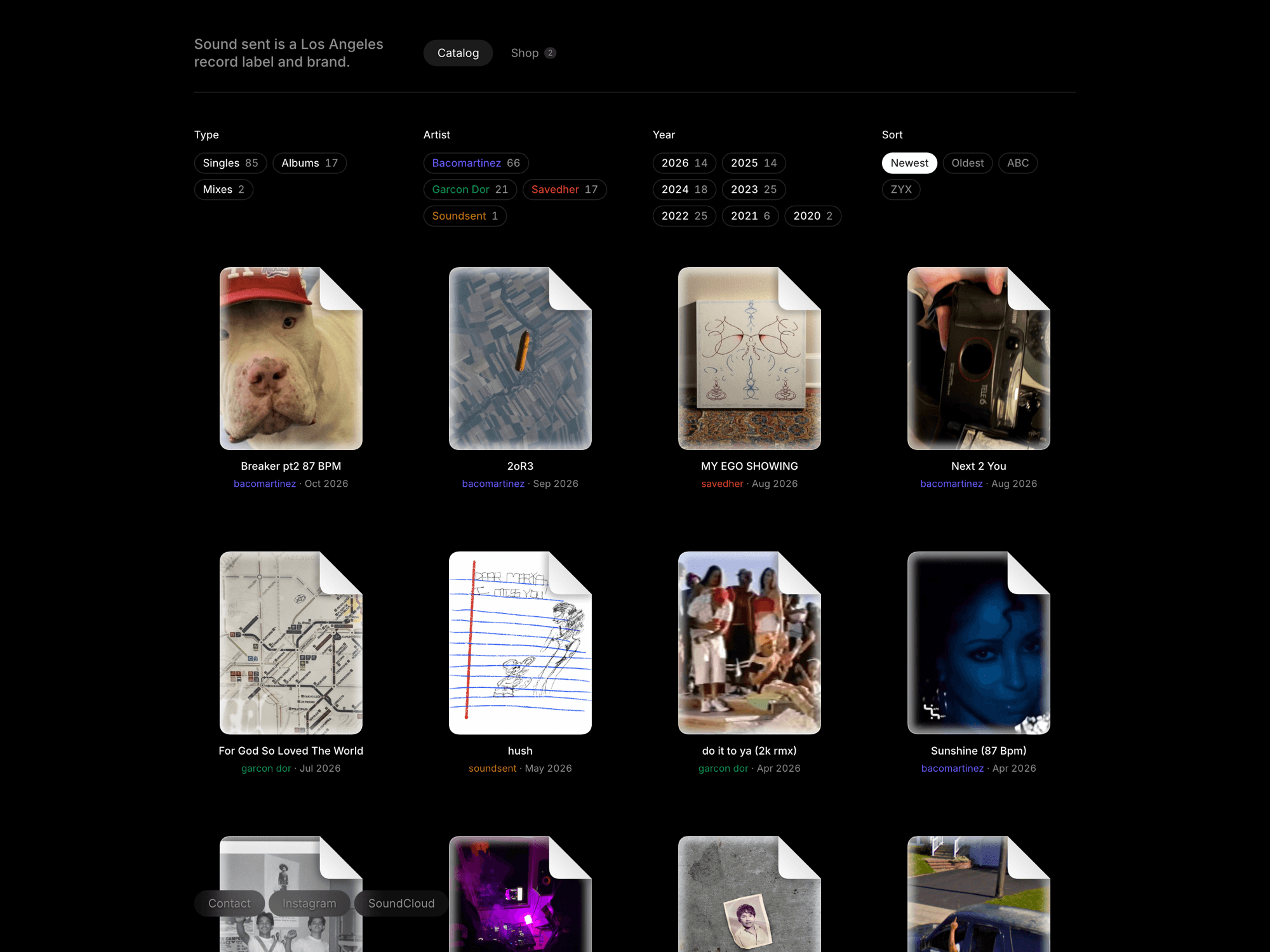
A hundred releases across three artists and four streaming sites, and no one place to see them. The label needed its catalog in one window, not one cover at a time.
Sound Sent is a Los Angeles record label and brand, owned and run by three artists: savedher, garcon d'or, and me, releasing as Baco Martinez.
Since 2020 the three of us have put out more than a hundred releases: singles, albums and mixes, spread across Bandcamp, SoundCloud, Spotify and Apple Music. Each one lived on whichever site it came out on. There was no single place to see what the label is.
The site is that place: every release in one catalog, one click from wherever it streams.
Thinking
The site went through three layouts in production before this one.
In May the home page was a dark marketing page: the label's name, a short line about who runs it, and a 3D cover flow of every release. It was a nice object, but it showed one release at a time. A label with a hundred releases needs to show all of them.
May: one cover in front and the rest turned away. Good for a single, not for a catalog.September: an index. Every cover at once, with filters down the side.
In September it became an index. The covers moved into a four-column grid with the filters in a sidebar, and that afternoon the filters started animating, which is the layout below. In October the page went dark, the filters became tags on the grid's own columns, the shop moved in next to the catalog, and every cover turned into a file.
Paths not taken
No product pages either. A shop item adds to the cart straight from its tile, and a release links straight out to where it streams.
Releases are files
On the site, every release is a document icon from a desktop. The cover is the page, the dog-eared corner folds over it, and the name sits underneath, the way it would in a folder of bounces on your own computer.
Loading preview…
Show code
import type { ReactNode } from "react";import { cn } from "@/lib/utils";/** * A macOS-style document icon (a page with a folded top-right corner) filled * with media, plus Finder's selected state and middle-truncated name. * * The page shape, glow blur and fold gradient live once in `FileIconDefs`; * every icon only references them by id, so a grid of 100 icons carries no * per-tile SVG defs and the media stays an ordinary lazily loaded element. * * Geometry is a 100 × 128 page: 8-unit corner radius, 30-unit dog-ear. */const DOC = "M8 0H70L100 30V120Q100 128 92 128H8Q0 128 0 120V8Q0 0 8 0Z";/** Same outline in 0–1 units for the HTML clip (clipPathUnits="objectBoundingBox"). */const DOC_BOX = "M0.08 0H0.7L1 0.234375V0.9375Q1 1 0.92 1H0.08Q0 1 0 0.9375V0.0625Q0 0 0.08 0Z";const FOLD = "M70 0V22Q70 30 78 30H100Z";const FOLD_EDGE = "M70 0V22Q70 30 78 30H100";/** Shared defs. Render once per page (hidden), before or after the icons. */export function FileIconDefs() { return ( <svg aria-hidden width="0" height="0" className="pointer-events-none absolute size-0 overflow-hidden"> <defs> <clipPath id="file-doc-clip" clipPathUnits="objectBoundingBox"> <path d={DOC_BOX} /> </clipPath> <clipPath id="file-doc-clip-vb" clipPathUnits="userSpaceOnUse"> <path d={DOC} /> </clipPath> <filter id="file-doc-blur" x="-20%" y="-20%" width="140%" height="140%"> <feGaussianBlur stdDeviation="2.5" /> </filter> {/* Paper is paper in any theme: the fold stays white to light grey. */} <linearGradient id="file-doc-fold" x1="0" y1="1" x2="1" y2="0"> <stop offset="0" className="text-white" stopColor="currentColor" /> <stop offset="1" className="text-neutral-300" stopColor="currentColor" /> </linearGradient> </defs> </svg> );}/** * The page: media clipped to the document shape, a white inner glow, a * hairline edge and the folded corner. Pass the media (an <img>, a <video>) * as children; it is stretched to cover the page. */export function FileIcon({ children, className }: { children?: ReactNode; className?: string }) { return ( <span className={cn( "relative block aspect-[100/128] w-full bg-muted [&>:not(svg)]:absolute [&>:not(svg)]:inset-0 [&>:not(svg)]:size-full [&>:not(svg)]:object-cover", className, )} style={{ clipPath: "url(#file-doc-clip)" }} > {children} <svg aria-hidden viewBox="0 0 100 128" className="pointer-events-none absolute inset-0 size-full"> <g clipPath="url(#file-doc-clip-vb)"> {/* White inner shadow: a wide blurred stroke on the edge, clipped to the inside. */} <path d={DOC} fill="none" className="stroke-white" strokeOpacity="0.55" strokeWidth="9" filter="url(#file-doc-blur)" /> <path d={DOC} fill="none" className="stroke-white" strokeOpacity="0.35" strokeWidth="2" vectorEffect="non-scaling-stroke" /> {/* Shadow cast by the dog-ear onto the page. */} <path d={FOLD_EDGE} fill="none" className="stroke-black" strokeOpacity="0.35" strokeWidth="4" filter="url(#file-doc-blur)" /> </g> <path d={FOLD} fill="url(#file-doc-fold)" /> </svg> </span> );}/** * Finder-style middle truncation: "A VERY LONG RELEASE TITLE.wav" → * "A VERY LONG RELE…TITLE.wav". Keeps the start and the last few characters, * so similar names stay distinguishable. Counts graphemes, not UTF-16 units. */export function middleTruncate(text: string, max = 34, tail = 9): string { const chars = Array.from(text.trim()); if (chars.length <= max) return chars.join(""); const head = max - tail - 1; return `${chars.slice(0, head).join("").trimEnd()}…${chars.slice(-tail).join("").trimStart()}`;}/** * A desktop icon: the document, a centered name under it and an optional * info line (Finder's "Show item info"). Hover or keyboard focus inside the * tile (or `selected`) shows Finder's selected state: a grey ring around the icon (no fill) * and a solid pill behind the name. Wrap it in a link or button yourself; * the selected state follows `:focus-visible` anywhere inside. */export function FileTile({ name, info, media, selected = false, className,}: { /** Full name; shown middle-truncated, announced in full. */ name: string; /** Second line under the name, e.g. "artist · Sep 2026". */ info?: ReactNode; /** The media that fills the page (an <img>, a placeholder). */ media?: ReactNode; /** Hold the selected state (e.g. the item a menu or preview belongs to). */ selected?: boolean; className?: string;}) { /* Spans only, so the tile is valid inside the <a> or <button> you wrap it in. */ return ( <span data-selected={selected || undefined} className={cn("group flex w-full flex-col items-center gap-1", className)}> <span className={cn( "block w-full rounded-[10px] p-1.5 ring-2 ring-transparent ring-inset transition-shadow duration-150 ease-out motion-reduce:transition-none", "group-hover:ring-muted-foreground/40 group-data-[selected]:ring-muted-foreground/40", "group-has-[:focus-visible]:ring-ring in-[:is(a,button):focus-visible]:ring-ring", )} > <span className="mx-auto block w-[78%]"> <FileIcon>{media}</FileIcon> </span> </span> <span title={name} className={cn( "block max-w-full rounded-[5px] px-1.5 py-px text-center text-[12px] leading-[15px] font-medium [overflow-wrap:anywhere] text-foreground transition-colors duration-150 ease-out motion-reduce:transition-none", "group-hover:bg-foreground/75 group-hover:text-background group-data-[selected]:bg-foreground/75 group-data-[selected]:text-background", "group-has-[:focus-visible]:bg-foreground/75 group-has-[:focus-visible]:text-background in-[:is(a,button):focus-visible]:bg-foreground/75 in-[:is(a,button):focus-visible]:text-background", )} > <span aria-hidden>{middleTruncate(name)}</span> <span className="sr-only">{name}</span> </span> {info ? <span className="block max-w-full truncate text-center text-[11px] leading-[14px] text-muted-foreground">{info}</span> : null} </span> );}
The selected state is a ring around the page and a pill behind the name, never a tint, so the cover art stays exactly as it was made.
Long names shorten in the middle, like Finder: the start and the last nine characters stay. Releases with similar beginnings still look different, and the ending never disappears.
The page shape, the inner glow and the folded corner are defined once on the page, and every icon points at them. A hundred icons carry no copies of the same drawing, so a tile stays cheap to paint while the grid moves it.
The grid rearranges
A filter on a catalog usually means a new list: the tiles that leave vanish, and the ones that stay jump to their new places. You lose track of what moved.
Here nothing is removed. Every release is drawn once and stays on the page. A filter only reorders the tiles and hides the rest, and anime.js's layout animation moves each tile from where it was to where it lands. The ones that stay travel to their new cells, the ones that go shrink and fade where they stood, and the ones that come back grow in where they land.
Loading preview…
Show code
"use client";import { createLayout, spring } from "animejs";import { memo, useLayoutEffect, useRef, type ReactNode } from "react";import { cn } from "@/lib/utils";type Item = { id: string };const Cell = memo(function Cell<T extends Item>({ item, render }: { item: T; render: (item: T) => ReactNode }) { return <>{render(item)}</>;}) as <T extends Item>(props: { item: T; render: (item: T) => ReactNode }) => ReactNode;/* * Tuned so the move reads as tiles travelling into place: a soft spring * (bounce 0.18, no visible overshoot) over 560ms, and leavers / arrivals * scaling between 0.9 and 1 as they fade. No stagger: createLayout staggers * across hidden tiles too, which held survivors back for over a second. */const MOTION = { duration: 560, ease: spring({ bounce: 0.18, duration: 560 }), enterFrom: { opacity: 0, scale: 0.9 }, leaveTo: { opacity: 0, scale: 0.9 },};const prefersReducedMotion = () => typeof window !== "undefined" && window.matchMedia("(prefers-reduced-motion: reduce)").matches;/** * Show `visibleIds` in order (moving their nodes) and hide the rest. Nothing is * mounted or unmounted. Tiles are found by `data-tile-id`, never * `data-layout-id`: anime.js keeps its own node ids in that attribute and * deletes it on revert(), which hid every tile after a remount. */function applyVisible(root: HTMLElement, visibleIds: readonly string[]) { const shown = new Set(visibleIds); const nodes = Array.from(root.querySelectorAll<HTMLElement>(":scope > [data-tile-id]")); const byId = new Map(nodes.map((el) => [el.dataset.tileId, el])); for (const id of visibleIds) { const el = byId.get(id); if (!el) continue; el.hidden = false; root.appendChild(el); } for (const el of nodes) if (!shown.has(el.dataset.tileId ?? "")) el.hidden = true;}/** * A grid whose filter and sort changes are one anime.js layout animation * (https://animejs.com/documentation/layout): every item stays mounted, the * grid records where each tile is, the DOM is reordered and hidden in place, * and `createLayout` animates each tile from its old box to its new one. * Survivors travel to their new cells, leavers shrink and fade where they * stood, arrivals grow in where they land. * * Cells are memoised, so a change re-renders the grid shell only. Keep * `renderItem` stable (module scope or `useCallback`). */export function FlipGrid<T extends Item>({ items, visibleIds, renderItem, className, "aria-label": ariaLabel,}: { /** Every item, in a stable order. Never filter this list; filter `visibleIds`. */ items: readonly T[]; /** Ids to show, in display order. */ visibleIds: readonly string[]; renderItem: (item: T) => ReactNode; /** Columns and gaps, e.g. "grid-cols-4 gap-x-10 gap-y-16". */ className?: string; "aria-label"?: string;}) { const rootRef = useRef<HTMLOListElement>(null); const layoutRef = useRef<ReturnType<typeof createLayout> | null>(null); const primedRef = useRef(false); const visibleKey = visibleIds.join("|"); useLayoutEffect(() => { const root = rootRef.current; if (!root) return; const layout = createLayout(root, { children: "[data-tile-id]", ...MOTION }); layoutRef.current = layout; return () => { layout.revert(); layoutRef.current = null; primedRef.current = false; }; }, []); useLayoutEffect(() => { const root = rootRef.current; if (!root) return; const ids = visibleKey ? visibleKey.split("|") : []; const layout = layoutRef.current; // The first pass only places tiles; reduced motion swaps without animating. if (!primedRef.current || !layout || prefersReducedMotion()) { applyVisible(root, ids); primedRef.current = true; return; } // React never moves these nodes (stable keys, stable order), so the // "before" state can be recorded here, after render, before the swap. layout.record(); applyVisible(root, ids); layout.animate(); }, [visibleKey]); return ( <ol ref={rootRef} aria-label={ariaLabel} className={cn("relative m-0 grid w-full list-none content-start p-0", className)}> {items.map((item) => ( <li key={item.id} data-tile-id={item.id} className="m-0 p-0"> <Cell item={item} render={renderItem} /> </li> ))} </ol> );}
The same six tiles before and after. Nothing is rebuilt, so your eye can follow a release to its new place.
With reduced motion on, the grid swaps without moving.
Proof
sound-sent.com is live with the full catalog: 104 releases from 2020 to now, each artist's name in its own colour, and a shop.
The catalog comes from a Notion database the label already keeps. A release shows up on the site when its row is marked done, and a script fills in each row's tracklist, cover and release date from its Bandcamp page. Adding a release is adding a row.
Filtered to albums. The counts update as you filter, and a year with nothing left dims instead of disappearing.
The cost is that every release is always on the page, hidden or not, and every filter has to measure where things are before it can move them.
Learnings
Move what's already there
When the content stays put, a change reads as a rearrangement rather than a new page. That's the rule I took from this: keep the elements, and change where they are.
anime.js got the idea working in an afternoon. Making it fast on a hundred tiles meant writing the measurement myself.